Document photos prepared to spec
100% free tools. No uploads. No data stored. Drop a photo to resize it to an exact size, or pick your exam.
We resize it to an exact KB size in your browser — nothing is uploaded.
Drop a photo, or click to browse
JPG, PNG or HEIC — a clear, front-facing photo works best
JPG · PNG · HEIC · processed on your device, never uploaded
Built on documented, published specifications — not opinions
Prepare application photos & documents using published specs
Pick your path — specification pages show a published source where available and flag entries that need review.
Exam & Government
Exam & Government Applications
Photo, signature and document sizes for 52+ Indian exam and recruitment forms — each linked to a named source and clearly labelled when current figures still need review.
Find your exam or formPassport & Visa
Passport & Visa Photos
Passport, visa and OCI photo preparation for 26+ countries — selected size, background guidance and linked source details.
Make a passport or visa photoDocument Utilities
Document Utilities
44+ free tools to resize, compress, convert, sign and read documents — everything runs in your browser.
Open all toolsPopular Workflows
What do you need to get done?
Passport & Visa Photo
Turn any selfie into a photo prepared to the published spec for your country, exam or ID — auto-cropped, sized and background-corrected.
Exam Application Kit
Follow the selected exam portal's photo workflow and prepare the separate files it lists — SSC, UPSC, Railway, Banking and more.
Signature Tools
Turn a paper signature into a clean, transparent PNG that's ready to drop into any form.
Image Processing
Resize, compress or convert a photo to a selected KB or pixel target.
PDF Tools
Compress, merge, split, sign and unlock PDFs to fit any portal upload limit — every file stays on your device.
Common Mistakes
Why photos get rejected
These measurable photo problems can conflict with listed requirements. easyPhoto flags measurable issues and can adjust size, background and framing.
Common reasons for rejection
Wrong head size
Incorrect background
Poor lighting
Face not centered
Wrong dimensions
Eyes not visible
Automated photo checks
Checked for measurable requirements(No detectable issues)
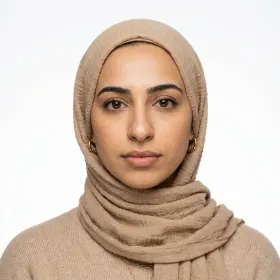
6/6
Checks Passed
No detectable issues found
Checked for measurable requirements
Size, background & framing measured
100% Private
Your photos never leave your device
On-device results
Review measurable photo properties
No Account Needed
Free to use — no signup, no watermark
No signup • No uploads • 100% Free
Automated photo preparation
Automated checks for measurable details
From a selfie to a photo reviewed against measurable published requirements.Example walkthrough below, shown with a sample photo.
Your Selfie
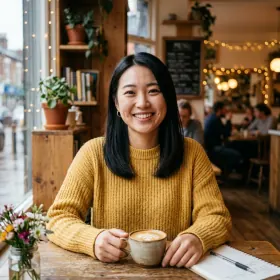
- 1
Busy Background
Background not plain
- 2
Uneven Lighting
Shadows on face
- 3
Face Not Centered
Not aligned properly
- 4
Wrong Size & Ratio
Incorrect crop & ratio
Automated photo checks
PassedAll Pass
- Head SizePass✓
- BackgroundPass✓
- Face CenteredPass✓
- Eye PositionPass✓
- LightingPass✓
- DimensionsPass✓
- Image QualityPass✓
Sample result: all 7 checks passed
Measured against the published specs for passport, visa, ID & more.
Prepared photo

Checked Against Published Requirements
Prepared for the published requirements of passport, visa, OCI and ID documents.
Upload
Upload your selfie from any device
Automated checks
Measures the photo against listed requirements
Checks Complete
Helps identify common rejection risks before you submit
Download
Download the prepared result when processing finishes
✦ Comparison ✦
easyPhoto vs Photo Studio
See how easyPhoto compares with a studio visit for creating document photos checked for measurable requirements — without leaving home.
Photo Studio
Traditional WayCost
Pricing depends on the provider
Varies
by provider
Turnaround Time
Timing depends on the provider
Varies
by provider
Travel Required
Need to visit the studio
Yes
Travel needed
Re-take / Retry
Retake policy depends on provider
Ask
before booking
Pre-submission photo check
Ask which checks are included
Ask
Background Removal
Ask whether this is included
Ask
Country / Exam Specs
Ask which specifications are used
Ask
the provider
Photo Privacy
Ask how files are handled
Ask
the provider
easyPhoto
Smarter WayCost
100% free to use
FREE
Always
Turnaround Time
Runs in your browser
On device
Time varies
Travel Required
Create from the comfort of home
No
From home
Re-take / Retry
Unlimited re-takes
Unlimited
Always free
Pre-submission photo check
Checks run before you download
✓Background Removal
Automated background removal
✓Country / Exam Specs
Named country and exam records
Linked
Sources
Photo Privacy
Never uploaded. 100% private
✓
Automated Photo Preparation
Adjusts size, background and framing with browser-based tools.
Published Requirement Sources
Specifications cite a published source where available.
Your Privacy First
We process everything in your browser. No uploads.
On-device & Free
Processing time varies by image and device.
No signup. No payment. Measurable photo checks.
Popular Countries
View all countries
India
Passport · Visa · ID
USA
Passport · Visa
UK
Passport · Visa
Canada
Passport · Visa
More countries
 Australia
 Schengen Visa
 Germany
 France
 Italy
Italy Netherlands
 Ireland
 UAE
UAE Saudi Arabia
 Bahrain
 Kuwait
 Qatar
Qatar Oman
Oman Pakistan
 Nepal
Nepal Spain
Spain Portugal
 China
China Singapore
 New Zealand
 Japan
Japan Malaysia
Popular Documents
ID & Other Documents
Aadhaar Card
UIDAI
PAN Card
Income Tax India
OCI Card
Ministry of Home
Driving License
All States
Voter ID Card
Election Commission
26+
Countries Supported
Requirements from named authorities
52+
Exam Specifications
SSC, UPSC, Railway, Banking & more
Linked
Spec Sources
Official source where available
44+
Free Tools
Photo, PDF, signature & more
0
Uploads to any server
Everything runs in your browser
All tools at your fingertips
Passport Photo Maker
Country presets with published sources
LinkedIn Photo Maker
Professional headshots
Resume / CV Photo
Job applications & CVs
Photo Print Sheet
4×6 inch, A4 & more sizes
Pre-submission Check
Check photo + signature before you submit
Camera Capture
Take photo directly in browser
Guides to the rules
What each authority actually publishes, traced to the notice it came from — and what it does not publish, said plainly.
July 22, 2026 · 5 min read
SIR Form Photo Size 2026 — What the ECI Actually Requires
Millions are searching for a "SIR photo size" during the electoral-roll revision. The online enumeration form has no photo upload, and the ECI publishes no such spec — here is what is actually true.
June 18, 2026 · 7 min read
SSC CGL & CHSL 2026 Photo: Live Capture Only — Spec & Resizer
SSC now requires live photo capture — no gallery uploads. See the published signature band, live-camera preparation and common measurable problems for CGL and CHSL.
June 13, 2026 · 6 min read
Exam Photo Rejected? 6 Reasons SSC, IBPS & UPSC Say No (2026)
“Photo not as per specification.” “Invalid signature.” Exam portals reject for a handful of predictable reasons — here's every one, and the quick fix for each.
June 13, 2026 · 5 min read
How to Add Name & Date to an Exam Photo (2026)
APPSC and Kerala PSC use a digital name-and-date treatment; UPSC, SSC and IBPS do not, while Navy and Airforce Agniveer notices use a physical slate.
June 24, 2026 · 6 min read
Indian Passport Photo Rules 2026: Adults vs Children Under 4
Ordinary adults do not upload or carry a passport photo to a PSK/POPSK: it is captured at the centre. The 35×45 mm white-background print is the below-four exception.
June 18, 2026 · 6 min read
Best Free Passport Photo Maker Online India (2026)
Ordinary adults are photographed at the PSK/POPSK. For the below-four print and separate overseas workflows, here are five tools compared on cost, privacy and format support.
Why your photos stay private
A server-based editor sends documents away from your device. easyPhoto instead runs the editing steps inside your browser, so the selected photos and IDs are not uploaded to an easyPhoto server.
100% Browser Processing
Every edit runs on your own device. Your photo is never sent to a server.
No Upload Required
Files stay local. Nothing leaves your phone or laptop — not even temporarily.
No Account Needed
No sign-up, no email, no login. Open a tool and start in one tap.
No Data Stored
We keep nothing. Close the tab and every trace of your photo is gone.
Frequently asked questions
Is my photo uploaded to a server?
No. Every step (face detection, cropping, background replacement and file compression) runs entirely in your browser. Your image is never sent to or stored on any server.
Is it really free? Is there a watermark?
Yes, it's completely free with no watermark, no sign-up and no payment. You download the full-quality photo.
What can the photo checks confirm?
The tool can size the head, apply the selected background and review measurable image properties before download. It cannot predict acceptance. Check the linked source and the current application instructions before submitting.
Why is the background light grey rather than white for the UK and Schengen?
For Schengen, because some consulates — Switzerland in particular — do ask for grey. For the UK it is a preference, not a rule: HM Passport Office accepts any plain light colour and names shades of white among its examples. Light grey is used as one setting that suits both, and you can change it.
What photo should I use?
A clear, front-facing photo in good, even lighting with a neutral expression and your whole head and the top of your shoulders visible. Higher-resolution photos give sharper results that are easier to inspect.
Can I use this for both printing and online upload?
Yes. You get a print-ready file at the correct millimetre size and DPI, and a separate upload-ready file compressed under the portal's file-size limit.